Case Study • Enterprise & EdTech • 2024
Assedra: School Inventory Management
Transforming chaotic spreadsheets and lost paper logs into an intuitive, real-time asset ecosystem designed specifically for educational staff.

From biology lab microscopes and library books to classroom projectors and administrative laptops, schools oversee thousands of shared assets. Yet most institutions rely on fragmented paper logbooks or unwieldy Excel sheets.
Assedra bridges the operational gap between teachers, storekeepers, and school boards—introducing simple check-in wizards, clear audit trails, and automated reminders without the cognitive friction of enterprise accounting software.
The Challenge: The Hidden Cost of Lost Equipment
Schools operate on tight budgets where misplaced lab kits or unreturned laptops directly disrupt classroom learning. Existing enterprise asset software is designed for corporate procurement officers, creating an immediate mismatch with the daily reality of busy educators.
01. The Administrative Void
When equipment goes missing, paper sign-out sheets offer zero accountability. Records are lost, handwriting is illegible, and administrators spend hours hunting for assets instead of managing school operations.
02. The Software Usability Mismatch
Commercial inventory platforms are cluttered with financial depreciations, tax ledgers, and complex forms. Teachers and storekeepers reject them because basic item checkout takes five minutes of administrative overhead.
“How might we design a seamless, intelligent inventory system that feels like a trusted educational assistant rather than cumbersome corporate accounting software?”
Research & Operational Friction
Through in-depth interviews with secondary school principals, librarians, and facility managers across Nigeria, five structural pain points emerged:
Zero Real-Time Visibility
Administrators have no centralized dashboard showing who currently holds specific projectors, tablets, or sports kits. Equipment status is discovered only after someone asks for it.
Manual & Error-Prone Logs
Excel sheets and paper ledgers duplicate entries, get overwritten, or disappear during faculty handovers, creating friction during annual school board audits.
Absent Accountability Trails
Teachers borrow items informally between classes without documentation. When items return damaged or go missing, there is no verifiable custody trail.
No Overdue Notification System
Librarians and storekeepers rely on memory or hallway encounters to remind staff to return overdue items, creating awkward inter-departmental tension.
“I spend more time looking for the school's properties than actually managing the school.”— School Administrator, Enugu State
Design Process
A phased human-centered approach focused on reducing cognitive load at every stage of the inventory lifecycle:
Research
Contextual inquiry with administrators, librarians, and storekeepers.
Journey Maps
Mapping loan checkout, return verification, and damaged item escalations.
Architecture
Structuring a shallow 3-tier hierarchy for sub-2-second search.
Prototyping
Iterating wireframes into interactive Figma flows with staff testing.
Validation
Moderated testing sessions validating check-out speeds and error rates.
Stakeholder Personas
We mapped the emotional and operational realities of three core institutional roles responsible for school assets:
Abigail Eze, 47
Vice Principal • Enugu
Oversees school physical assets for board audits. Stressed by missing receipts and disputes over lost laptops.
UX Priority: One-click audit reports and instant real-time custody overview.
Idris Olanrewaju, 35
Storekeeper • Ibadan
Manages equipment check-out daily. Struggles with manual logs during power outages and busy morning rushes.
UX Priority: Fast 3-step item assign wizard and mobile-responsive check-in.
Lara Yusuf, 29
School Librarian • Lagos
Tracks library books and tablets. Constantly deals with overdue returns and unorganized physical inventory.
UX Priority: Automated email/SMS return reminders and instant ISBN/serial lookup.
Information Architecture: Shallow & Fast
To accommodate staff with varying levels of technical comfort, the IA is organized around four core operations: Inventory Catalog, Quick Assign, Audit Reports, and Return Reminders.
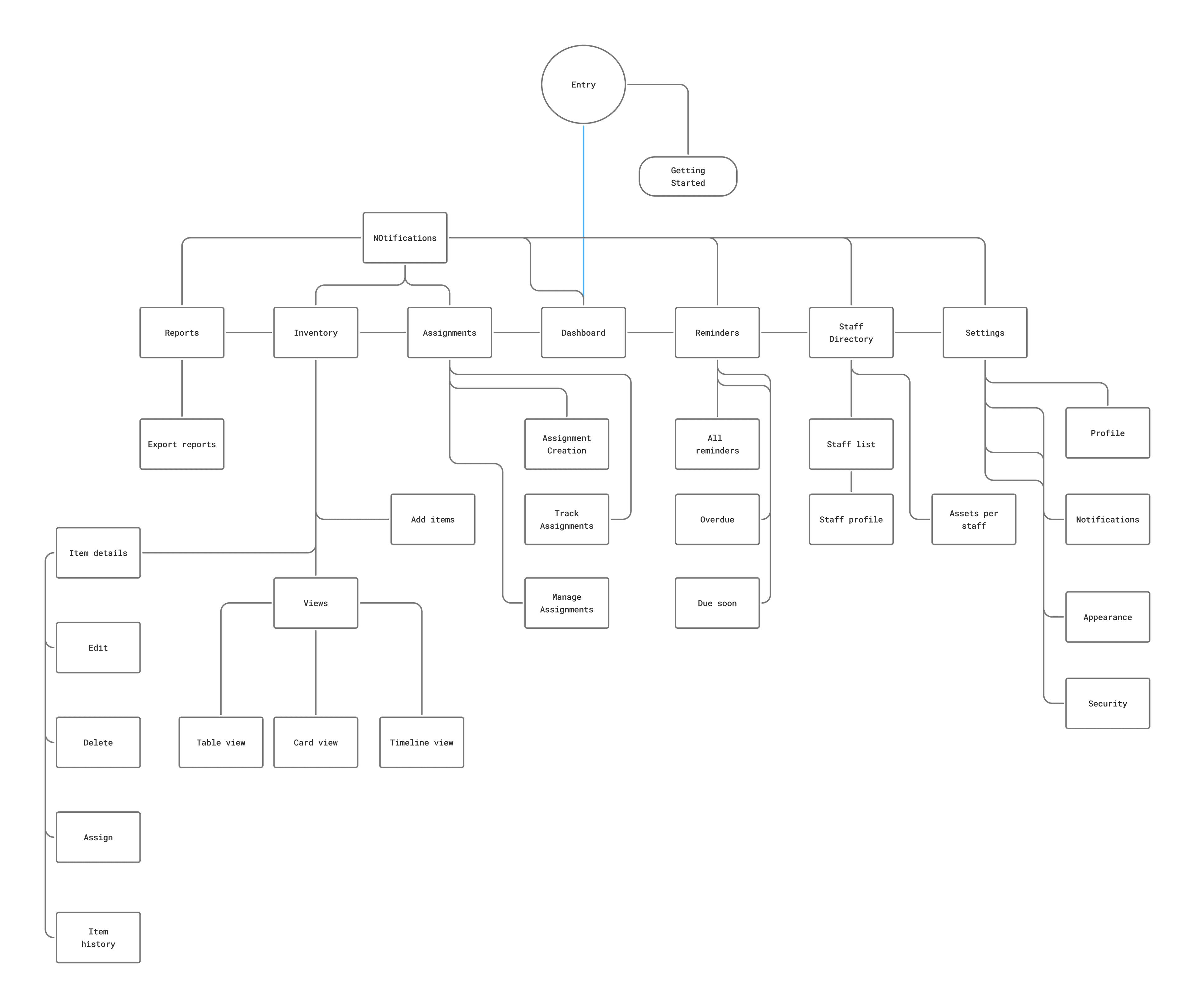
Global navigation anchors the top bar with universal search, allowing any asset, serial number, or faculty member to be located in less than two seconds from any screen.
User Flows: Streamlining Core Interactions
Rather than forcing staff through endless form fields, we mapped out four streamlined pathways that turn complex database entries into rapid, guided interactions.
Item Registration & Cataloging
Storekeeper clicks “Add Item” → selects pre-filled category template → inputs serial or scans barcode → assigns physical room location → receives instant QR tag confirmation for physical asset labeling.
Reduces item intake time from 8 minutes to 45 seconds.
Quick Assign & Custody Handover
Global search retrieves item → taps “Assign” → selects staff from auto-complete directory → sets expected return date → system logs custody handover with automated calendar sync.
Eliminates disputed paper checkout signatures permanently.
Return Verification & Condition Check
Item located via Active Loans view → one-click “Mark Returned” → optional condition rating (Good, Damaged, Needs Repair) → asset status returns to Available immediately.
Flags equipment issues before re-issuing to other classrooms.
Automated Return Reminders & Audit
System tracks approaching due dates → sends polite automated reminders 48h prior → compiles monthly loss rate and utilization trends for PTA and board review with 1-click PDF export.
Removes awkward interpersonal friction between colleagues.
The Solution: Intelligent Simplicity
Assedra provides the robust accountability of an enterprise system with the effortless clarity of modern consumer software.
Quick Assign Wizard
A lightweight 3-step checkout flow that enables equipment handovers in seconds, eliminating manual ledger errors.
Sub-30-second checkout flow
Smart Reminders
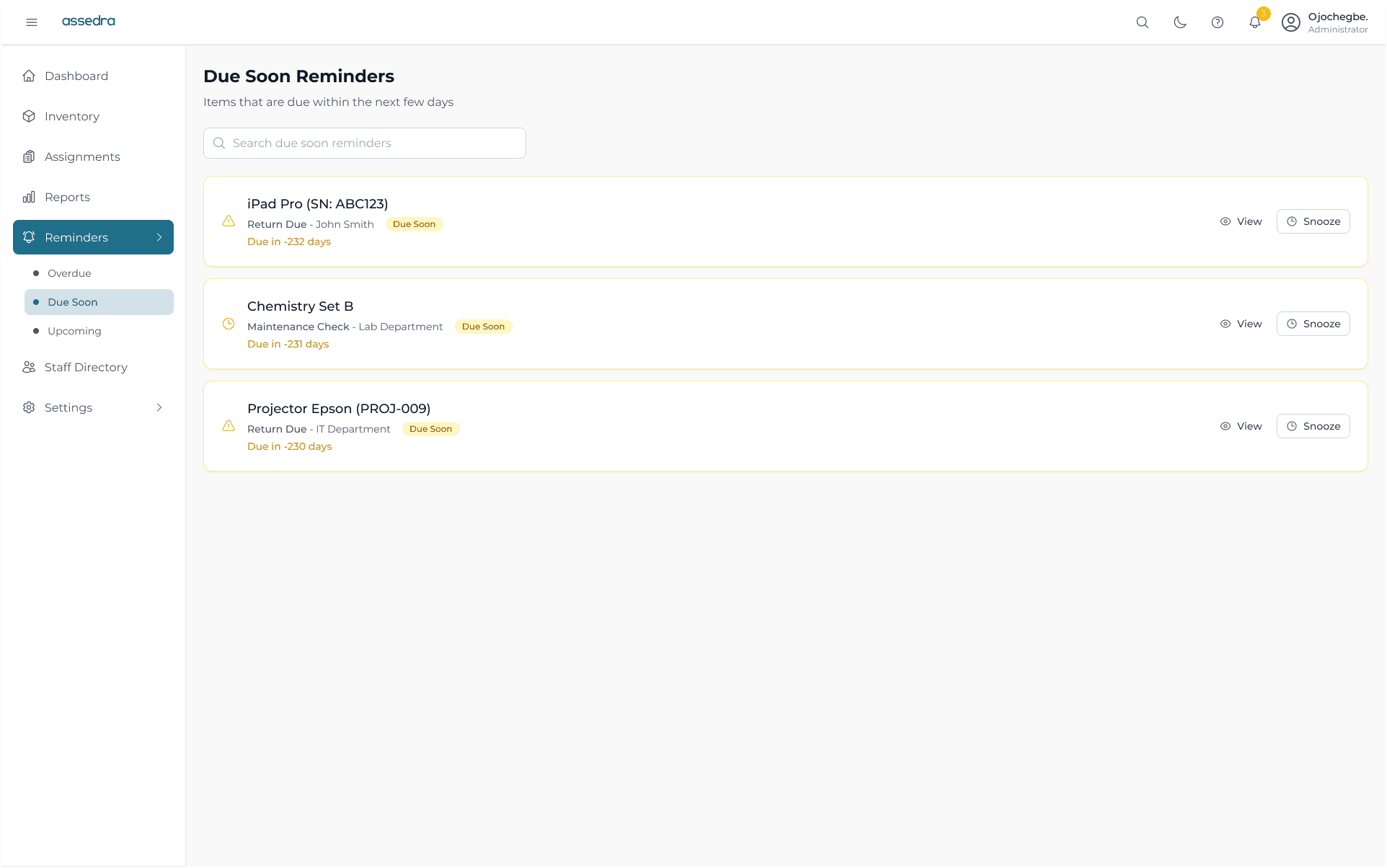
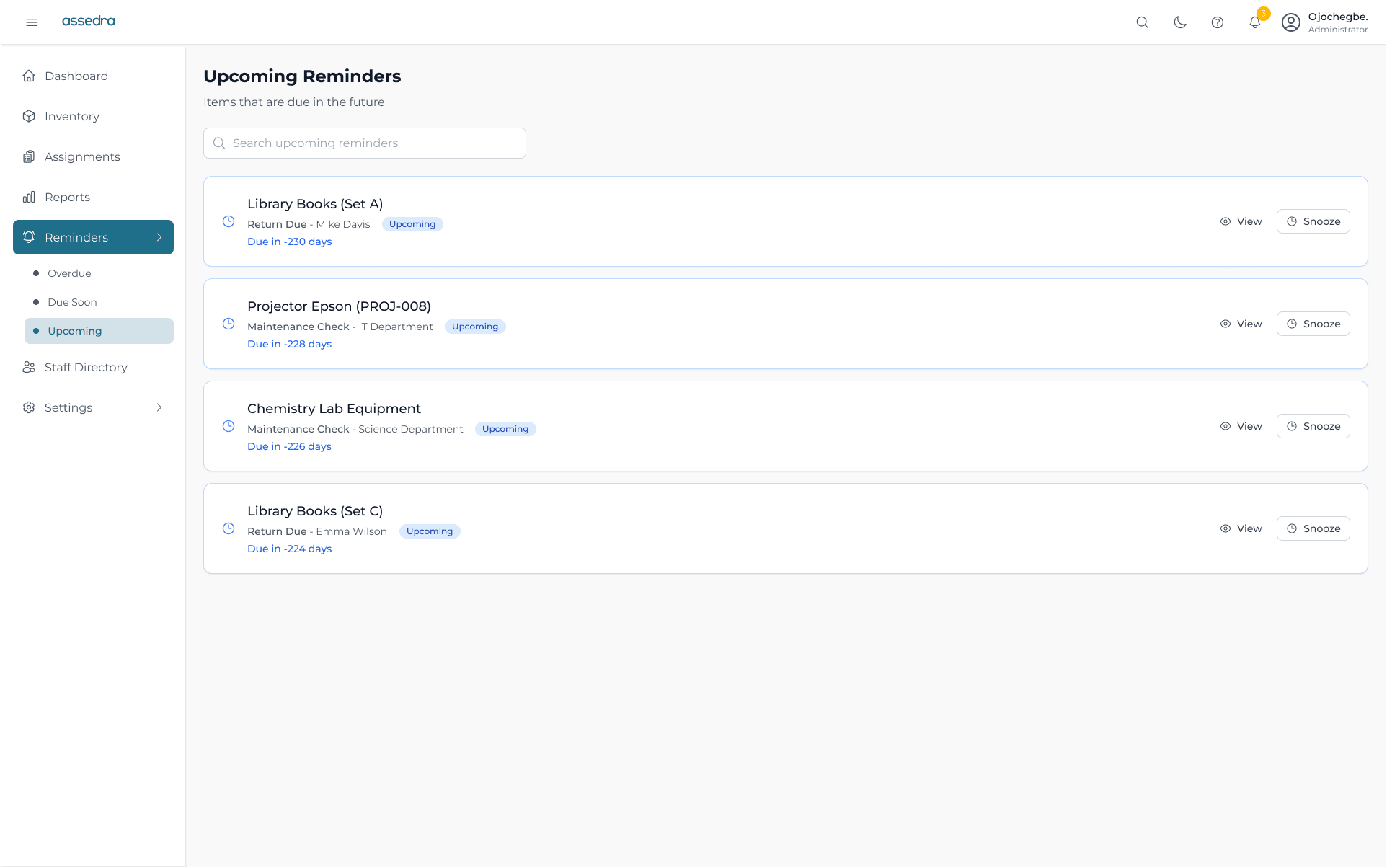
Automated email and in-app notifications for overdue returns and upcoming maintenance, removing awkward manual follow-ups.
Zero manual chasing
Audit Trails
Tamper-proof chronological histories for every single asset: who borrowed it, what condition it was in, and when it was returned.
100% verifiable custody history
Visual Analytics & Board-Ready Reporting
Turning thousands of equipment logs into clear, actionable visual summaries. Administrators instantly spot high-loss categories, underutilized hardware, and upcoming maintenance costs.
Final Designs: Core Screens Walkthrough
High-fidelity web application screens designed for high-contrast clarity and responsive operation across laptops, tablets, and desktop workstations.
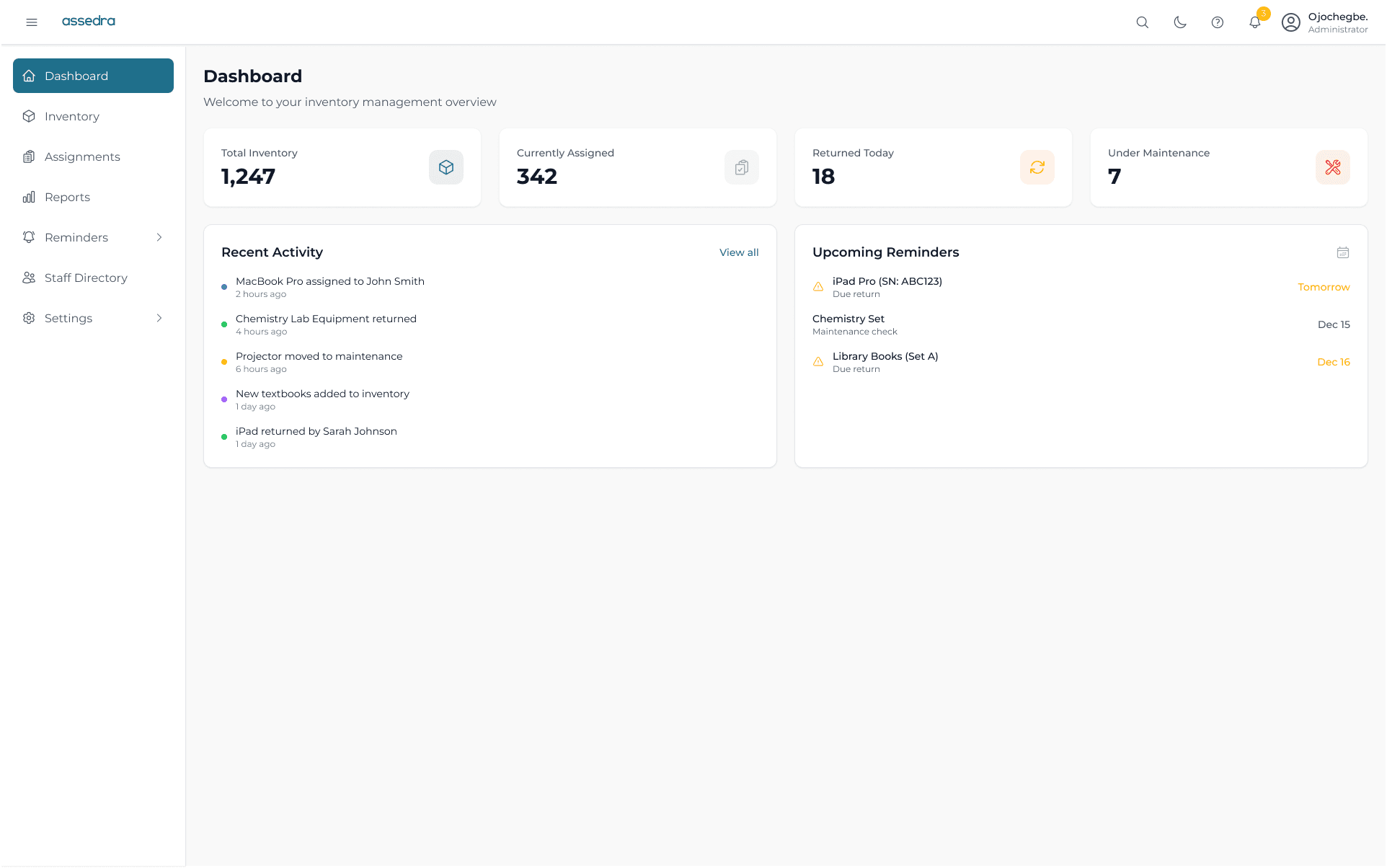
Main Dashboard Overview
High-level visibility into total school assets, active loans, overdue alerts, and quick action shortcuts for new check-outs.
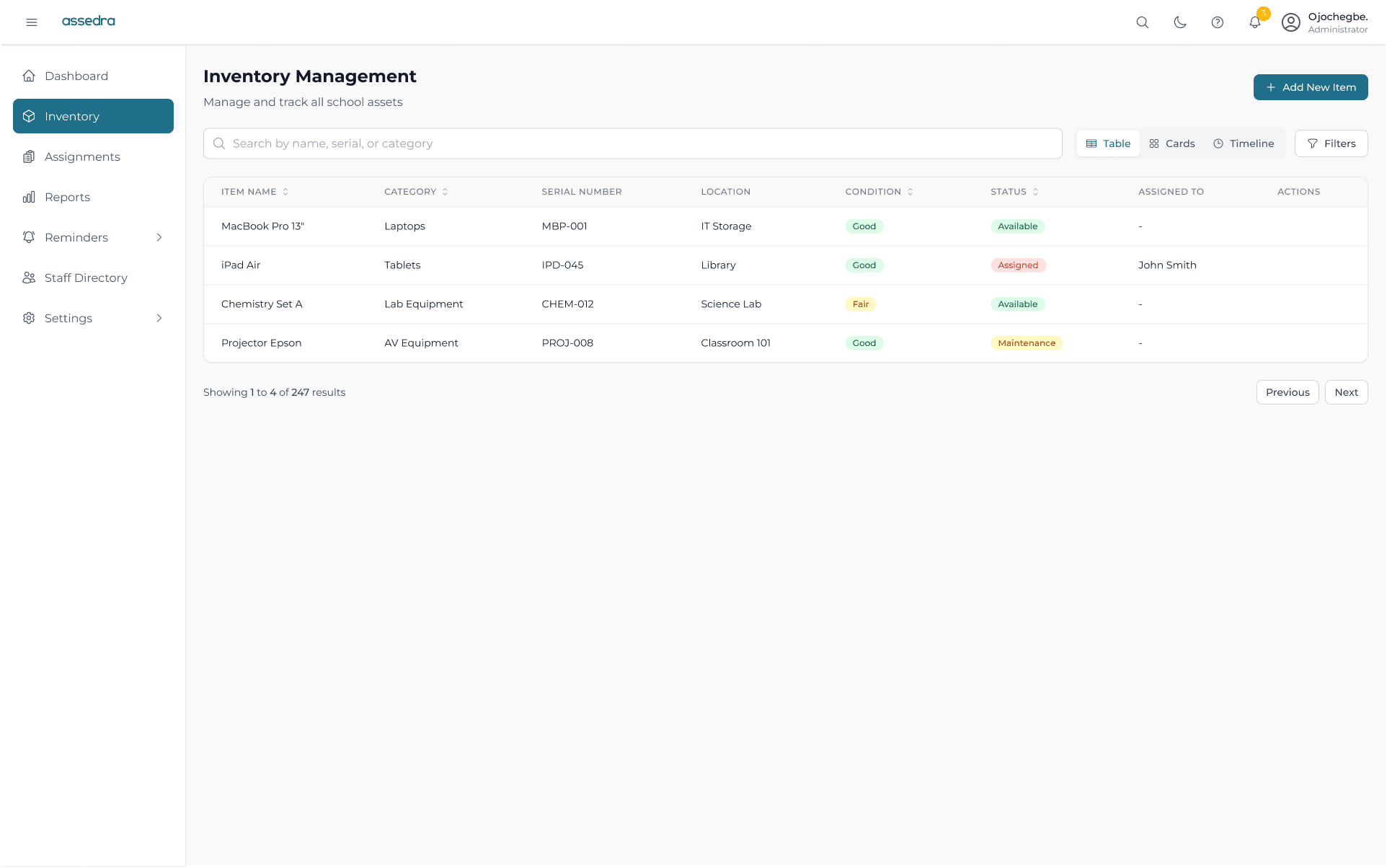
Inventory with Global Search & Multi-Filtering
Enables staff to filter by department, condition, location, or availability status with real-time query responses.
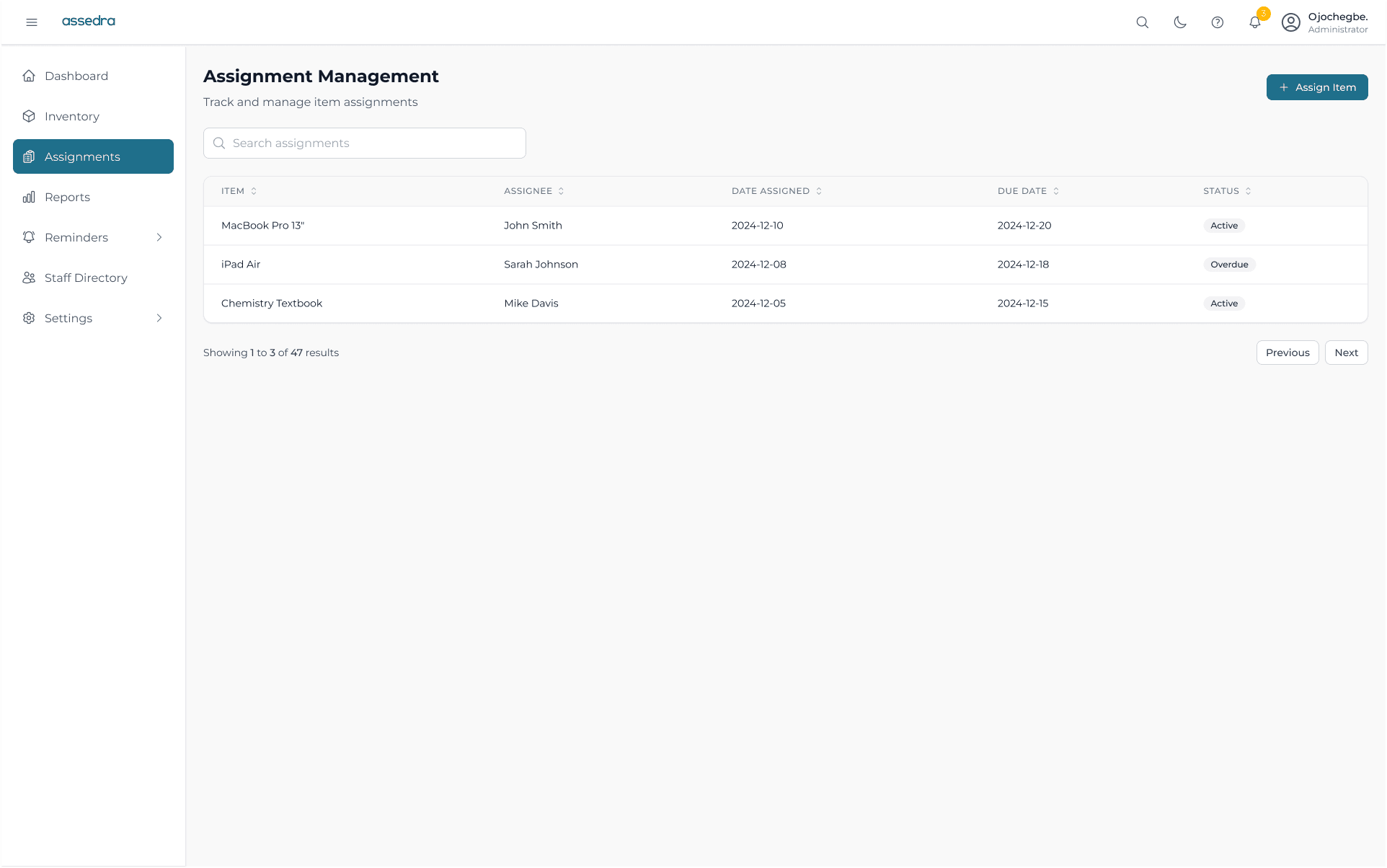
Streamlined Assignment Flow
Guided modal flow for staff handover: selects item, borrower, loan timeframe, and generates digital confirmation.
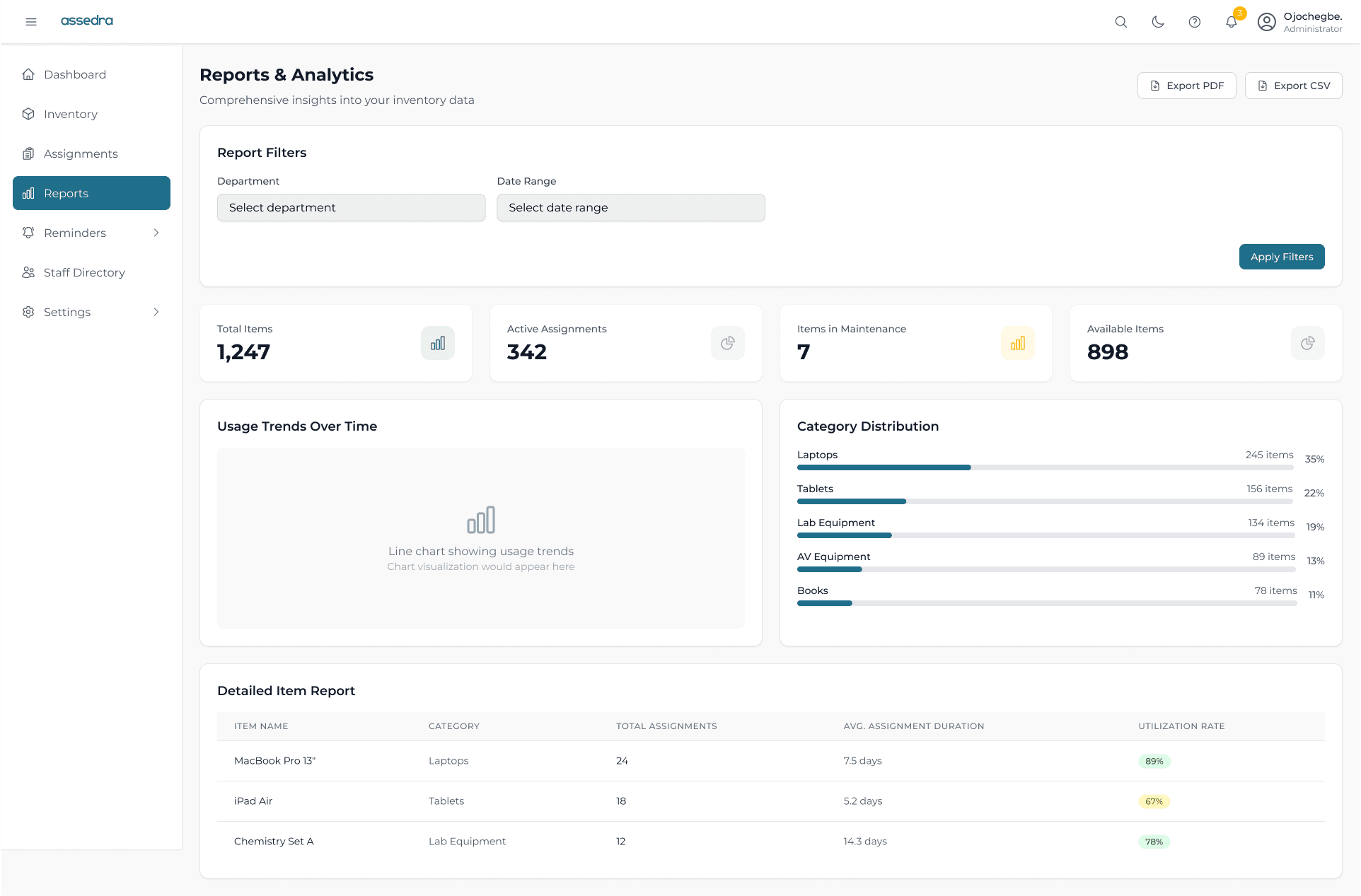
Visual Reports Dashboard
Interactive charts breaking down asset distribution, maintenance logs, and return compliance rates across terms.
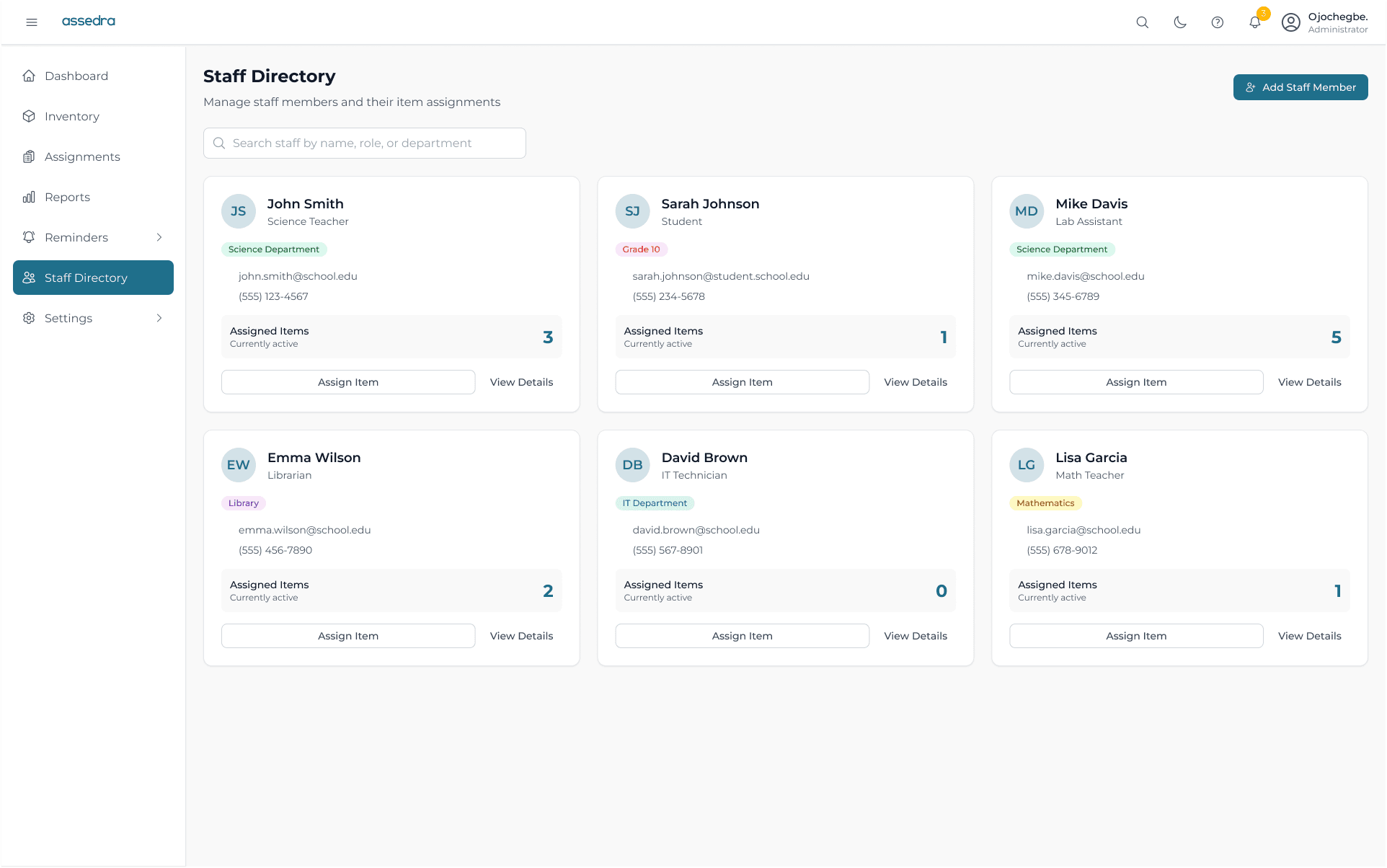
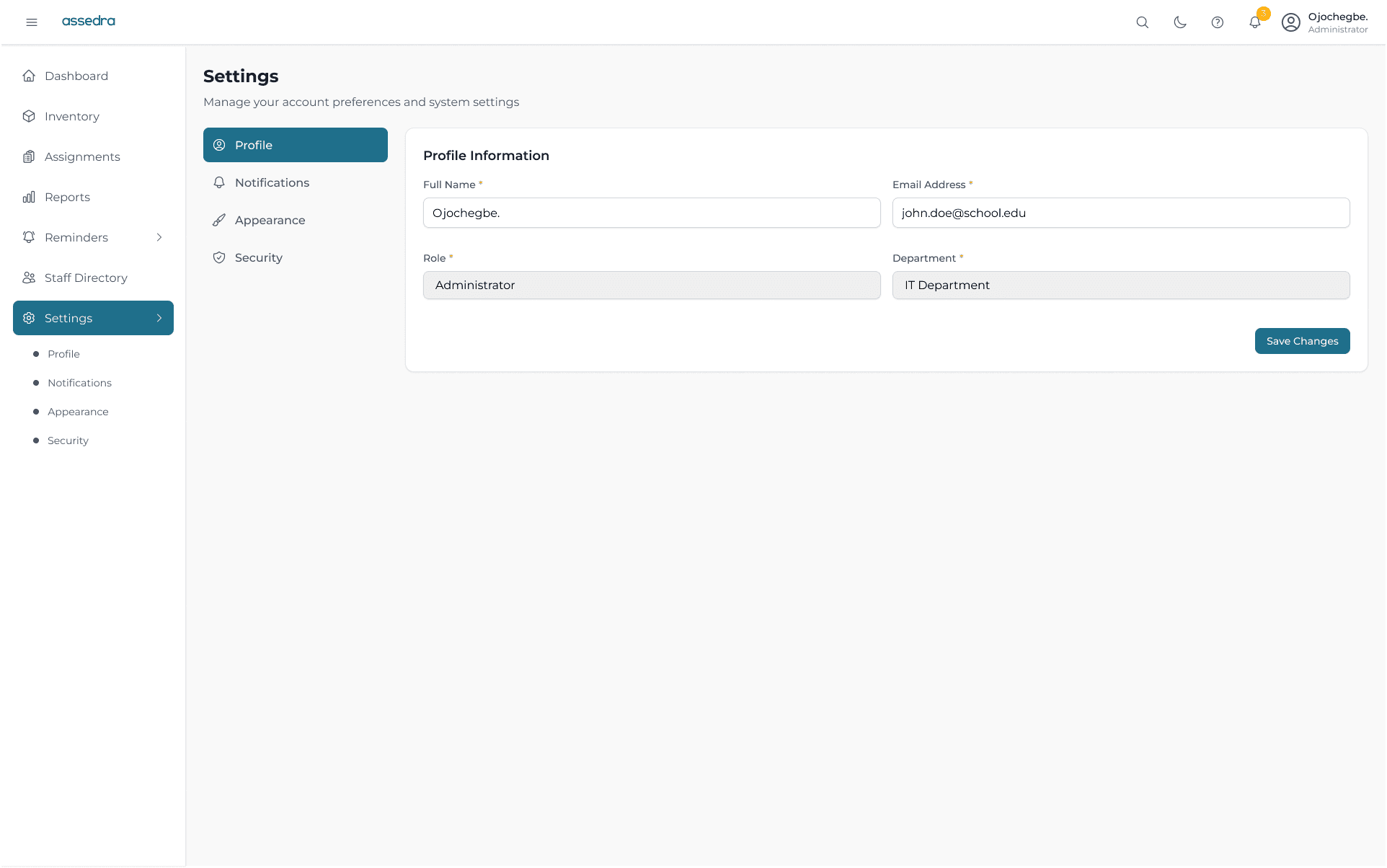
Other Pages
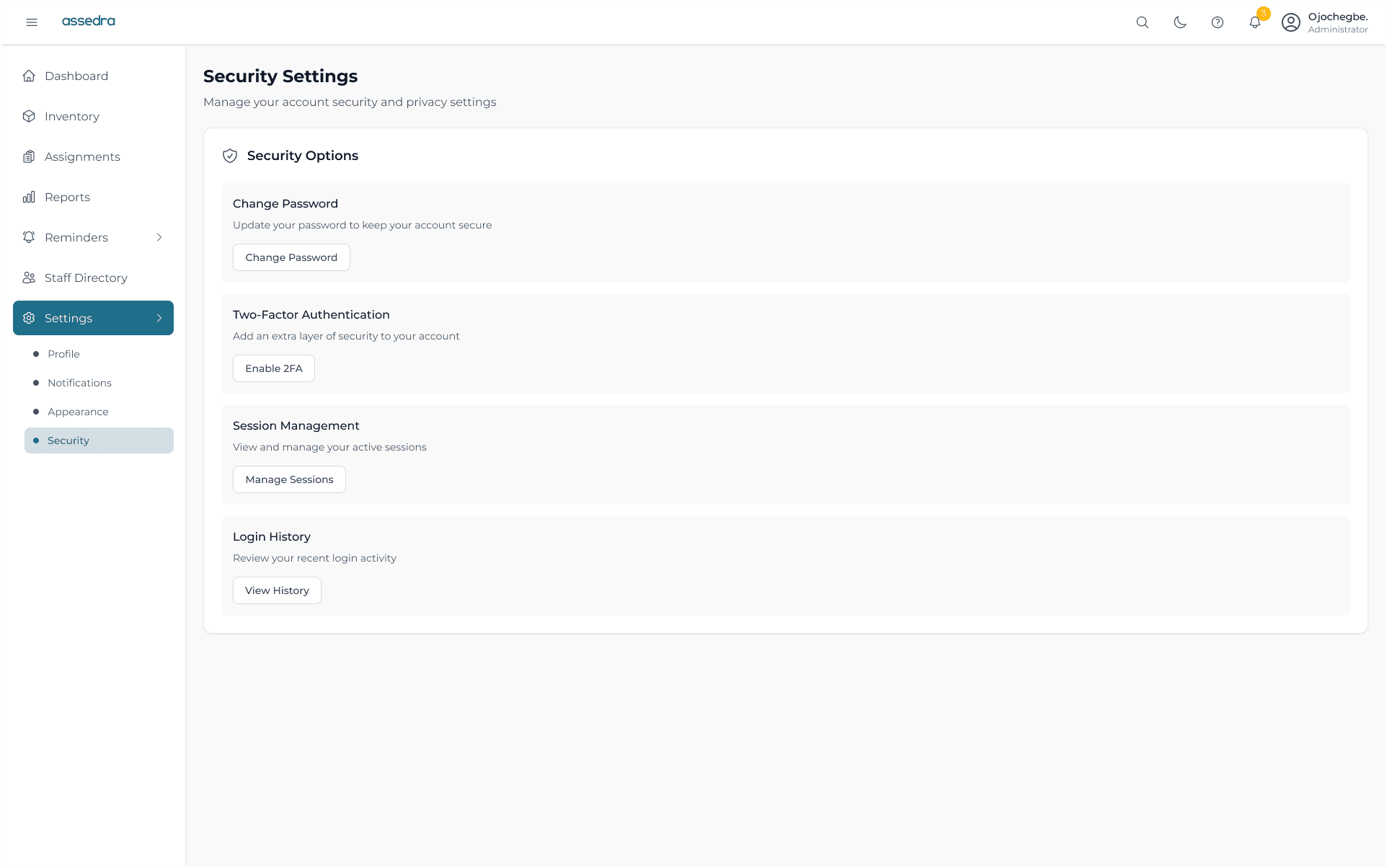
Additional screens, onboarding flows, and auxiliary interactions designed for the platform.
The Outcome: Institutional Impact
Assedra successfully transformed school asset operations by replacing administrative chaos with predictable, verified workflows:
Continuous Inventory Tracking
Institutions maintain accurate visibility across all campus assets without physical stocktaking delays.
Reduction in Asset Loss
Automated return reminders and staff accountability significantly curb misplaced equipment.
Spreadsheet Dependence
Eliminates duplicate Excel entries, missing sign-out binders, and handwritten ledger errors.
Audit-Ready Accountability
Generates board-ready audit reports and complete item custody histories in a single click.
Checkout Speed
Streamlined assignment wizards ensure teachers can borrow classroom tools between periods with zero hassle.
Cross-Device Mobility
Staff can verify equipment on tablets and smartphones directly from storerooms or labs.
Interactive Prototype Walkthrough
Demonstrating the live web application flow: from asset search and 3-step checkout to reminder management and analytics generation.
Reflection: Designing for Operational Realities
Designing Assedra reinforced that institutional software does not have to be painful. When you design around the true workflows of educators, efficiency becomes effortless.
Key Design Takeaways
- Respecting Educator Time: Teachers have 5 minutes between periods. Check-out flows must be sub-30-second interactions or they will be circumvented.
- Accountability Without Guilt: Automated reminders remove interpersonal conflict between colleagues, shifting reminders into systemic protocol.
- Resilient Workflows: Supporting quick barcode lookups and offline-tolerant caching is essential for infrastructure in emerging markets.
Future Enhancements
- RFID Smart Tags: Automated walk-through detection for library books and high-value laboratory equipment.
- Predictive Maintenance AI: Forecasting servicing intervals based on historical usage intensity and equipment age.
- Multi-Campus Centralization: Federated inventory pools for school districts sharing resources across multiple branches.
“When software respects the people who use it, tools stop feeling like administrative burdens and become trusted partners in delivering quality education.”